SMS Alert Program
Landscape.fyi Weather & Golden Hour Alerts
Program Overview
Pangolin Gears LLC is the parent company operating the consumer product platform landscape.fyi. All Landscape.fyi user-facing surfaces (website, app, SMS sender ID) are operated under this entity. Our SMS alert service sends automated weather and golden hour notifications to landscape photographers in the US and Canada who opt in. Messages include photography condition scores, forecasts, and ideal shooting windows for your saved locations.
How to Opt In
Account sign-up does not require a phone number and does not enroll the user in any SMS messaging. SMS alerts are an opt-in product feature collected only after account creation, and we deliberately separate phone verification (one-time, transactional) from the ongoing-alerts opt-in (recurring, consent-gated) — these are two independent actions on the Settings page.
Step 1 — Verify the phone number (transactional only)
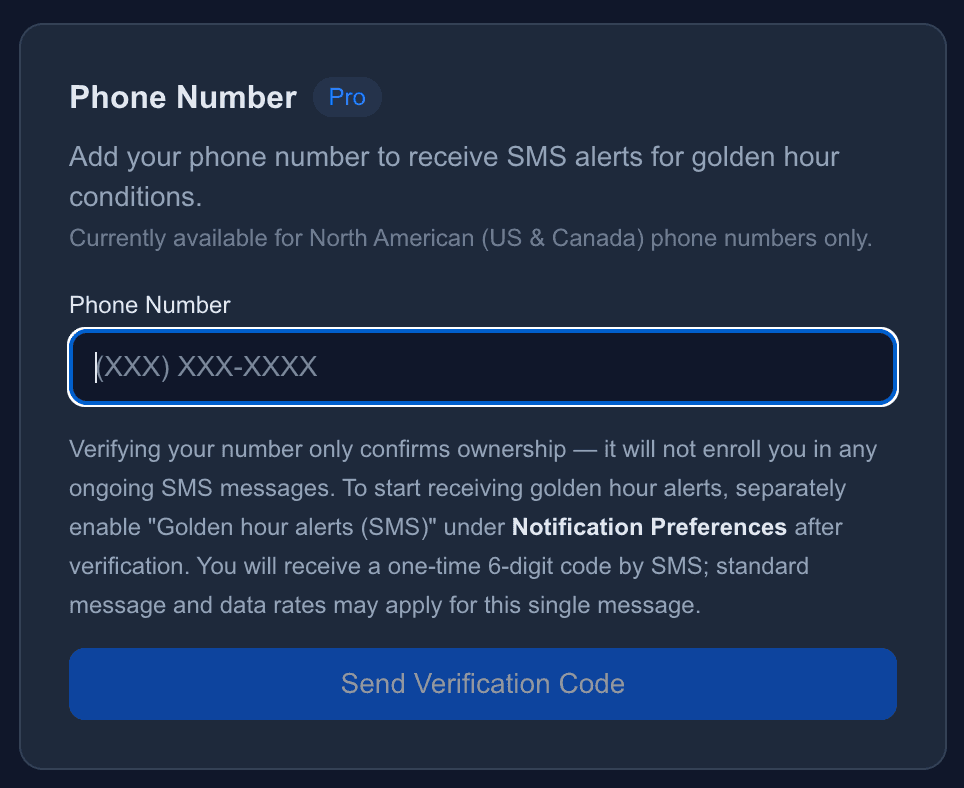
Under Settings → Phone Number, the user enters a valid US or Canada mobile number and clicks "Send Verification Code". A single transactional SMS is sent with the body: "Your Landscape.fyi one-time verification code is XXXXXX. Expires in 10 minutes. This is a single transactional message; you are not enrolled in any ongoing alerts." The user enters the 6-digit code to confirm ownership. No marketing or notification consent is bundled with this step. Verifying the number alone does not cause any further messages to be sent.
Step 2 — Opt in to ongoing alerts (separate consent)
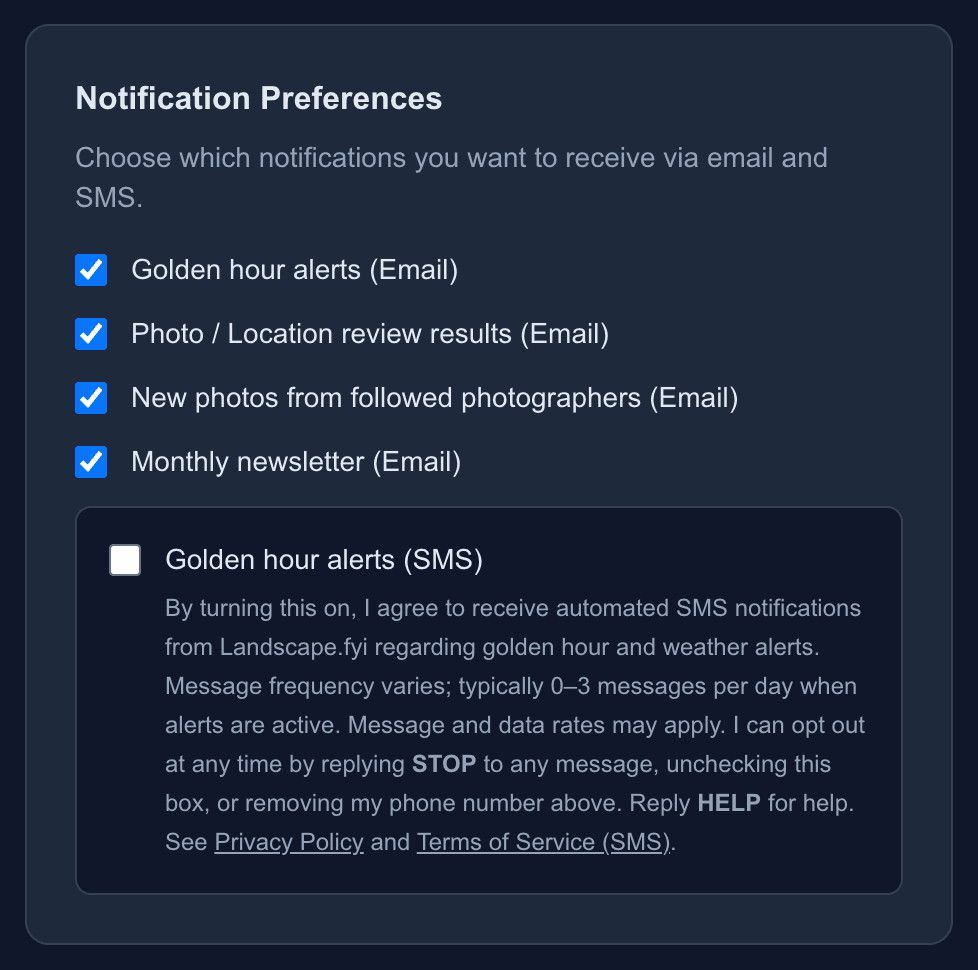
Under Settings → Notification Preferences, the user sees a checkbox labeled "Golden hour alerts (SMS)" that is unchecked by default and disabled until both a Pro plan is active and the phone number is verified. Beside the checkbox the full consent disclosure is shown verbatim: "By turning this on, I agree to receive automated SMS notifications from Landscape.fyi regarding golden hour and weather alerts. Frequency: 0–3 messages per day when alerts are active (your alert locations are combined into one text). Message and data rates may apply. I can opt out at any time by replying STOP to any message, unchecking this box, or removing my phone number above. Reply HELP for help." Inline links to the Privacy Policy and Terms of Service (SMS section) are part of the disclosure. The user must actively tick the checkbox; only then is the user enrolled in ongoing SMS alerts. On the off→on transition the server records asms_consent_attimestamp and asms_consent_versiontag identifying the exact disclosure that was displayed.
Currently available for North American (US & Canada) phone numbers only.
Opt-In Consent Interface
The two screenshots below show the exact UI on the Settings page. The opt-in flow is split across two independent controls; both require a free-account login.
Step 1 — Phone verification (transactional)
Step 2 — Ongoing SMS alerts opt-in (separate consent)
Message Frequency
0–3 messages per day when alerts are active. Messages are only sent when weather conditions at your alert locations meet your configured thresholds; several locations are combined into one message, and your plan's monthly allowance also applies.
Message and Data Rates
Message and data rates may apply. Contact your wireless carrier for details about your messaging plan.
How to Opt Out
You can opt out at any time by:
- Replying STOP to any message — you will receive one final confirmation and no further messages
- Removing your phone number from Settings
- Disabling SMS in your Notification Preferences
Help
Reply HELP to any message for assistance, or contact us at contact@pangolingears.com.
Privacy & Terms
Your phone number is used solely for delivering SMS alerts and is not shared with third parties for marketing purposes. For full details, see our Privacy Policy and Terms of Service (Section 23: SMS Communications).
Carrier Disclaimer
T-Mobile is not liable for delayed or undelivered messages.